


You can now send confidential email's on Gmail
- Ajay Boddinagula
- Dec 12, 2019
- 2 min read
If you are a fan of Gmail and using it since its official release, one of the many things you miss from your Inbox days is the ease of sending confidential messages. Well, fortunately, Google has now started rolling out the feature on the Gmail app and website as well.

The confidential feature allows users to send self-destruction messages and also allows them to set a password to it. I think the feature comes in handy when you want to send highly confidential matter and don't want others to know of it.
How to send email in confidential mode/self-destruction mode
To send an email in confidential mode, just follow the steps below.
Launch the Gmail app, and compose a new email. Once you’re done with that, tap on the three-dot menu on the top right, and tap on 'confidential mode'.


You will now be able to choose the expiration and also set a password to it.


Once you’re done, just tap on the 'save button', and that’s it. Gmail will schedule your email and it’ll be sent automatically at the time of your choosing

If you click on the SMS passcode, you have to enter the recipient's mobile number so that they can receive the text code when they want to open the message.


Once you’re done, just tap on 'send' and that’s it. Gmail will send your email and it’ll be destroyed automatically at the time of your choosing.

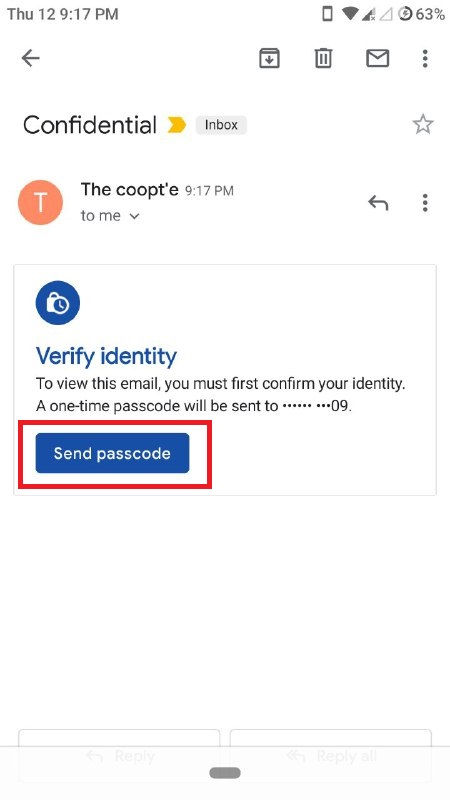
To view the message
The receiver should click on send passcode and enter the code manually to view the message.

Google is clearly trying to make the Gmail experience better, and bring it up to what Inbox offered (in some ways, if not all), and that’s something I really appreciate. The new features in Gmail are sure to make it handling emails easier for people, and confidential emails are just a boon for anyone who primarily uses emails for correspondence.

Comments