


How to remove bloatware from MI devices??
- Ajay Boddinagula
- Aug 15, 2020
- 2 min read
well we all know how mi devices come with pre-installed bloatware that is not used by us and it also eats lot of storage in phone.
so you can remove the bloatware easily and get worry free.
here is the step by step guide to do it. so lets dive into quickly.
First you need to enable usb debugging in your phone.
Go to settings and about phone.
Click on build number 7 times until you see a message you are now a developer.
Go to additional settings and then developer settings.
there you can see the option usb debugging, Just enable it.
Now you have successfully enabled USB debugging.
Download the ADB Platform tools and unzip it on desktop.
Now go to the extracted folder and click on the address bar and type cmd and Hit enter.
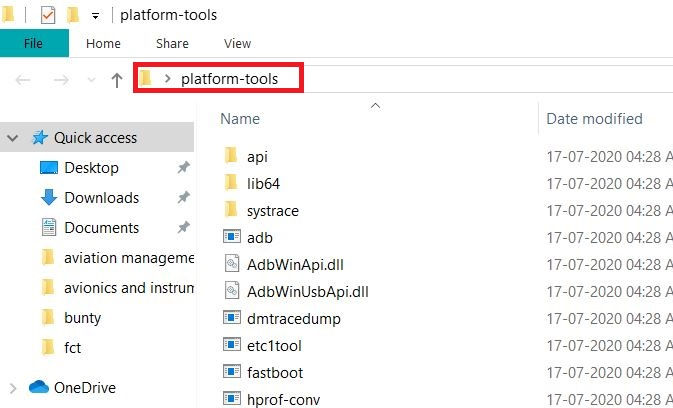
Now command bar will open, Now type

now type adb devices and hit enter it will show the list of devices

now type adb shell and hit enter

now you need to type the command pm uninstall -k --user 0 <name of package>
here name of the package is the name of the app you want to remove
for example if you want to remove mi browser the you need to type pm uninstall -k --user 0 com.android.browser
so below are some of the commands for popular apps just copy and paste it if you don't know
pm uninstall -k –user 0 com.google.android.apps.tachyon --- Google Duo
pm uninstall -k –user 0 com.google.android.music --- Google Music
pm uninstall -k –user 0 com.google.android.videos ---Play Movies
pm uninstall -k –user 0 com.android.browser --- Mi Browser
pm uninstall -k –user 0 com.miui.bugreport ---Mi Feedback
pm uninstall -k –user 0 com.miui.compass --- Mi Compass
pm uninstall -k –user 0 com.miui.notes ---Mi Notes
pm uninstall -k –user 0 com.miui.screenrecorder --- Mi Screen Recorder
pm uninstall -k –user 0 com.miui.videoplayer --- Mi Video
pm uninstall -k –user 0 com.miui.player --- Mi Music
pm uninstall -k –user 0 com.xiaomi.midrop --- Mi Drop
pm uninstall -k –user 0 com.xiaomi.mipicks ---Mi Apps
pm uninstall -k –user 0 com.xiaomi.scanner --- Mi Scanner
pm uninstall -k –user 0 com.google.ar.lens --- Google Lens
pm uninstall -k –user 0 com.google.android.apps.docs --- Google Docs
pm uninstall -k –user 0 com.android.chrome --- Google Chrome
pm uninstall -k –user 0 com.google.android.youtube --- Google YouTube
pm uninstall -k –user 0 com.duokan.phone.remotecontroller --- Mi Remote controller
pm uninstall -k –user 0 com.miui.enbbs --- Xiaomi MIUI Forum
pm uninstall -k –user 0 com.duokan.phone.remotecontroller.peel.plugin --- Peel Mi Remote
so well you can remove the bloatware form mi devices and other android devices similarlly.

Comments